

Personalised Decals for Laptops and Tablets: How to Choose the Right Fit
Before choosing a design for personalised decals for laptops and tablets, check the surface it will go on. A smooth finish on one case may suit a decal, while a textured coating or direct-to-device surface may not.
It’s sensible to be cautious. You want a design that looks neat and adheres as expected, without putting the device’s finish at unnecessary risk during application or removal. Compatibility depends on the exact material, coating and texture, so don’t assume a decal will suit every laptop, tablet or protective case.
This guide will help you compare decal materials and finishes, check your device or case before ordering, and apply a personalised design with care. You’ll also learn what to ask about UV DTF transfers, which have a clean, smooth, no-background finish and a slightly raised effect on suitable hard surfaces. A few practical checks can help you choose with realistic expectations and make your device feel more like your own.
Key Takeaways
- For personalised decals for laptops and tablets, check the exact device or case surface before choosing a design.
- Compare decal formats by surface suitability, finish, design size and application instructions.
- Check the case material and texture, and confirm compatibility before applying a decal, especially on polypropylene or other low-surface-energy plastics.
- For a neater application, start with a clean, dry surface, position carefully, press firmly and peel the carrier back at a low angle.
- Durability depends on the surface, careful application and curing time, so follow the specific product guidance.
Personalised decals for laptops and tablets: start with the surface
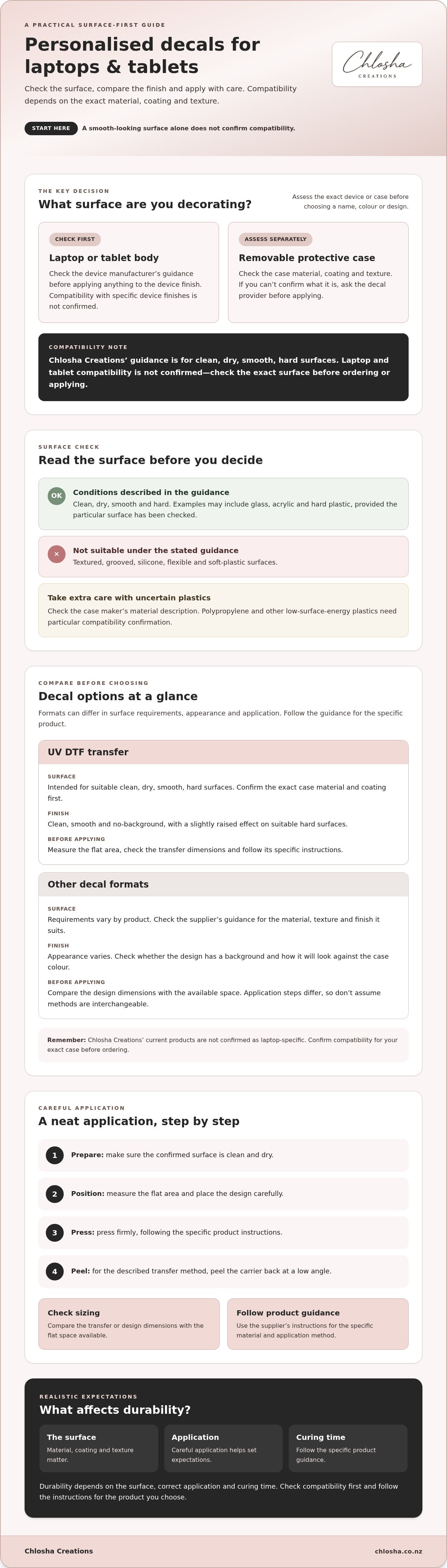
Before choosing a name, colour or design, identify the exact surface you plan to decorate. A decal is a decorative transfer applied to a compatible surface. You can read more about what a decal is and its common uses. For personalised decals for laptops and tablets, this distinction matters: a design that suits one case material or finish may not adhere as expected to another.
Chlosha Creations offers personalised decals and UV DTF transfers, but compatibility with specific laptop or tablet models, cases and device finishes isn’t confirmed. Check the exact material, coating and texture with the decal provider before ordering. Don’t assume that a transfer suitable for one hard surface will work on every device.
Laptop body or protective case: what are you personalising?
First decide whether the decal would go on a removable protective case or directly on the laptop or tablet body. Check the device manufacturer’s guidance before applying anything to the device finish. A smooth appearance alone doesn’t confirm the surface is suitable. A removable case can be assessed separately, but its surface still needs to be compatible with the transfer. If you can’t confirm its material or coating, ask before applying.
Which surfaces are suitable for UV DTF decals?
Chlosha’s guidance is for clean, dry, smooth, hard surfaces. Examples may include glass, acrylic and hard plastic, provided the particular surface has been checked. Compatibility is not confirmed for laptop or tablet surfaces, so treat these as material examples, not a blanket recommendation. Textured, grooved, silicone, flexible and soft-plastic surfaces aren’t suitable.
Look closely at the area you want to decorate. A case can seem smooth at first but have fine texture, ridges or a coating that affects adhesion. Check the maker’s description for the case material, then compare it with the transfer’s application guidance. If the surface is uncertain or doesn’t meet the stated conditions, don’t apply the decal until you’ve confirmed it’s appropriate.
Starting with the right surface helps set realistic expectations for how the decal may adhere and wear. Durability depends on the surface, correct application and curing time. Checking first is part of getting a neat result, not an unnecessary extra step.
Compare personalised laptop and tablet decal options before you buy
The right format depends on the case surface and the look you want. A decal that suits a smooth, hard case may not adhere to a textured or flexible one, so compare the material, finish and application instructions before choosing. Chlosha offers personalised decals and UV DTF transfers, but its current products aren’t confirmed as laptop-specific. Check compatibility for your exact case before ordering.
| What to compare | UV DTF transfer | Other decal formats, including vinyl |
|---|---|---|
| Surface compatibility | Intended for suitable clean, dry, smooth, hard surfaces. Confirm the exact case material and coating first. | Requirements vary by product. Check the supplier’s guidance for the material, texture and finish it suits. |
| Finish | A clean, smooth, no-background appearance with a slightly raised effect. | Appearance varies. Check whether the design has a background and how it will sit against the case colour. |
| Design size | Measure the flat area and check the transfer’s dimensions before ordering. | Compare the design dimensions with the space available and any size limits stated by the supplier. |
| Application | Follow the transfer’s specific instructions and confirm the surface is suitable. | Application steps differ between products. Follow the supplier’s instructions rather than assuming methods are interchangeable. |
What to check in a decal material and finish
UV DTF is one option, not a universal match for every device. Its clean, smooth, no-background finish can suit a simple name or a more colourful design, but surface compatibility comes first. Other formats, including vinyl, may offer different finishes and application methods. Don’t assume a format is removable, safer for a device or more durable without checking its specific product guidance.
For broader context on laptop skins and their application, Lenovo’s Comprehensive Guide to Laptop Skins discusses a different type of device covering. It doesn’t confirm that a particular decal will suit your case.
How to choose a design that suits your device
Measure the flat area where you’d like the design to sit, leaving space around edges, vents and openings. Then consider contrast: a name or icon should be easy to see against the case colour. Before ordering, confirm the final dimensions and application method with the supplier. You can also explore personalised name labels for other belongings, while checking that any decal intended for a device is suitable for its exact surface.
Check laptop and tablet case compatibility before ordering
A case can look smooth and still be unsuitable for a transfer. Its material, coating and texture all matter, so check the manufacturer’s description rather than relying on appearance alone. This is particularly important when choosing personalised decals for laptops and tablets, since a finish that works on one case may not suit another.
Materials and finishes to avoid
Chlosha’s guidance is for suitable smooth, hard surfaces. Avoid applying a UV DTF transfer to:
- Silicone, flexible materials or soft plastic
- Textured, grooved or uneven surfaces
- Polypropylene and other low-surface-energy plastics
- Uncoated paper
Some of these materials may appear smooth, but that doesn’t confirm they’ll accept a transfer. A small test area may help you assess cleaning or application instructions if the supplier recommends it. However, a test isn’t proof of long-term adhesion or performance.
Use this compatibility checklist
- Identify the material: Check the case packaging or manufacturer’s product information for its composition.
- Check the finish: Look for texture, grooves, a soft-touch coating or flexibility where you plan to place the design.
- Prepare the area: Follow the transfer’s cleaning instructions. The surface should be clean and dry before application.
- Confirm suitability: If the material, coating or texture is unclear, ask the seller before ordering. Don’t treat a test patch as confirmation of long-term results.
A general comprehensive guide to laptop skins can explain how device coverings differ, but it can’t confirm compatibility for a particular decal or case.
Questions to ask before choosing a personalised decal
Give the seller the case’s exact material and finish, then ask whether the decal is intended for that surface. Confirm the design dimensions and any placement requirements, such as needing a flat area clear of ridges or openings. If you can’t verify these details, pause before ordering. Chlosha’s current UV DTF transfers aren’t confirmed as laptop-specific, so device and case suitability needs checking.
If you’re looking for name personalisation for other belongings, browse the personalised name labels range. Check each product’s intended use rather than assuming it’s suitable for a laptop or tablet case.
Apply and maintain your compatible decal with care
Once you’ve confirmed the case is suitable, take your time with placement. A small device surface can make positioning tricky, so decide where the design will sit before removing its carrier. Follow the specific instructions supplied with the transfer, as application details can vary.
A careful application sequence for a suitable hard surface
- Prepare the surface. Clean it according to the transfer’s instructions, then let it dry fully. Dust, moisture or residue can affect how well the transfer adheres.
- Position the design. Check alignment and spacing before application. Keep it clear of openings, edges and areas that need to remain unobstructed.
- Press firmly. Apply even pressure across the design, or use a squeegee if the product instructions recommend one.
- Peel slowly. Remove the carrier at a low angle, watching to see that the design stays on the surface. If part lifts, lower the carrier and press that area again before continuing.
- Allow curing time. Leave the transfer undisturbed for about 24 hours before returning the item to normal use.
If a section needs help adhering, use a warm hair dryer on a low setting only if the product guidance allows it. Keep the heat gentle and follow the supplier’s instructions. Don’t assume the decal can later be removed without residue or without affecting the case finish.
What affects decal durability on a device case?
Surface type, careful application and curing time all influence how a transfer performs. Even a smooth, clean case may not be compatible if its material or coating isn’t suitable. After application, follow the care guidance for the specific transfer and avoid rubbing or cleaning the design in ways the instructions don’t recommend.
The 72-hour wait before dishwasher exposure applies only where that guidance is relevant to an item intended for dishwasher use. It isn’t a reason to put a laptop or tablet case in a dishwasher. Never treat a decal as permanently waterproof or dishwasher-proof. Durability depends on the surface and how the transfer is applied and cared for.
Chlosha’s UV DTF transfers have a clean, smooth, no-background finish with a slightly raised effect on suitable hard surfaces. Device-specific compatibility isn’t confirmed, so check the case material and follow the instructions provided for the particular transfer. For personalising other belongings, explore Chlosha’s personalised name labels and check each product’s intended use.
Choose a personalised decal with realistic expectations
A good choice starts with three checks: confirm the exact surface is suitable, choose a design that fits the available space, and follow the application and care guidance for that transfer. That’s the practical way to approach personalised decals for laptops and tablets. A design may look just right, but appearance alone can’t confirm that it will adhere well to a particular case.
Chlosha Creations offers personalised decals and UV DTF transfers with a clean, smooth, no-background finish and a slightly raised effect on suitable smooth, hard surfaces. These are personalised transfers, not a confirmed laptop-specific range. Device and case materials, coatings and textures vary, so check the exact surface before ordering or applying one.
When a personalised decal may be a good fit
A personalised design may suit someone who has confirmed that their smooth, hard case is compatible and wants to add a name, icon or artwork. Check the flat area available and the design dimensions, too. A removable case can be assessed separately from the device, but it still needs to meet the transfer’s surface requirements. Durability depends on the surface, application and curing time.
Personalisation can also help make everyday belongings easier to identify. For ideas beyond device cases, browse the personalised name labels collection and check each option’s intended use.
What to do if you’re unsure
Pause before applying anything. Check the case manufacturer’s care guidance and material information, including any coating, texture or flexibility. If the details aren’t clear, contact the decal seller with the case’s exact material and finish, and ask whether the transfer is suitable. A surface that appears smooth isn’t enough to confirm compatibility, and a small test area can’t guarantee long-term performance.
Once suitability is confirmed, check the design size and placement, then follow the supplied instructions carefully. If you can’t verify that the case is compatible, it’s safer to choose another way to personalise your device than to guess. Explore the name label options for other belongings, and confirm product suitability before ordering for a specific surface.
Make your choice with confidence
The best personalised decals for laptops and tablets start with a surface check, not just a design choice. Confirm the case material, coating and texture, then check the decal’s dimensions and application instructions. If you’re unsure, ask the seller before ordering or applying it.
Chlosha Creations is a family-run New Zealand business offering locally made UV DTF transfers. On suitable smooth, hard surfaces, they have a clean, smooth, no-background finish with a slightly raised effect. Laptop and tablet compatibility isn’t confirmed, so check your exact surface first. Durability depends on surface suitability, careful application and curing time.
Ready to explore personalisation for other belongings? Explore personalised name labels, and confirm surface suitability before choosing a decal. A little care at the selection stage can help you choose a design that feels just right.
Frequently Asked Questions
Can you put personalised decals on a laptop?
It depends on the laptop’s surface and whether the decal is intended for it. Chlosha’s UV DTF transfers are described for suitable smooth, hard surfaces, but laptop-specific compatibility isn’t confirmed. Check the device manufacturer’s care guidance and identify the exact surface material before applying anything. A compatible removable hard case may be easier to assess separately than the laptop body, but its material and finish still need checking.
Are UV DTF decals suitable for tablets?
They may suit a compatible smooth, hard surface, but that depends on the tablet or case material, texture and coating. Chlosha’s guidance doesn’t confirm compatibility with every tablet or case. Before ordering or applying a decal, check the manufacturer’s advice and ask the seller about your exact surface. The phrase personalised decals for laptops and tablets covers different devices and finishes, so don’t assume one transfer suits them all.
Will a decal damage my laptop or tablet?
There’s no general guarantee that applying or removing a decal will leave every device finish unaffected. Surfaces and coatings vary, and an unsuitable material or later removal may affect the finish. Check the device manufacturer’s care guidance first, and don’t assume a transfer is removable without damage. If you want to personalise your device, consider whether a compatible protective case is a better option than applying a decal directly to the device body.
What surfaces should I avoid when applying a UV DTF decal?
Avoid textured or grooved surfaces, silicone, flexible or soft plastic, uncoated paper and low-surface-energy plastics such as polypropylene. The surface should be clean, dry, smooth and hard, but a smooth appearance alone doesn’t confirm compatibility. If you can’t identify the material or coating of a laptop or tablet case, check its product information and confirm suitability with the decal seller before applying a transfer.
How do you apply a personalised UV DTF decal?
Apply it only to a suitable, clean, dry, smooth, hard surface. Position the decal carefully, then press or squeegee it firmly and peel the carrier back slowly at a low angle. A warm hair dryer on a low setting may help if needed, but follow the supplied instructions. Allow about 24 hours before normal use. Correct application and the surface both affect how the transfer performs, so take care not to rush.
Can I put a laptop decal in the dishwasher?
No. A laptop or tablet should never be treated as dishwasher-safe. Chlosha’s guidance says to wait about 72 hours before dishwasher exposure where appropriate, but this applies only to suitable items intended for that kind of cleaning. It doesn’t mean electronics or every case can go in a dishwasher. For a laptop or tablet case, follow the device and case manufacturer’s cleaning instructions instead.
How do I choose the right size personalised decal for a laptop or tablet?
Measure the flat area on the case where you’d like the design, leaving room around edges, openings and hinges. Compare your measurements with the seller’s available design dimensions before ordering. Check that placement won’t interfere with ventilation, ports, cameras, buttons or how the case fits. Also confirm the surface is suitable: the right size won’t help if the case material, coating or texture isn’t compatible with the decal.
